Accounts - Smart Accounting System
Dedicated DatabaseEvery Sales Invoice Now Has to Reach the Tax Authority. Ours Get There on Their Own.
Pakistan's FBR Digital Invoicing and Saudi Arabia's ZATCA Phase 2 both require sales invoices to be transmitted to the tax authority — not filed later, but at the moment you issue them. IO Snack Accounts does that from inside your ledger: post the invoice, and it is submitted, stamped and returned with its IRN or cleared UUID and QR code, ready to hand to the customer. Both authorities are covered by the Tax Filing & Compliance add-on. Underneath it is a complete double-entry system — Chart of Accounts, Journal Entries, Fiscal Years, and live Financial Reports (Trial Balance, Balance Sheet, Income Statement, Cash Flow, GL), Quick Transactions for daily bookkeeping, Petty Cash, reusable Templates and full team permissions — IFRS and GAAP compliant, with native VAT, GST and sales-tax engines for any jurisdiction.
-
FBR Digital Invoicing (Pakistan) — built to the official DI API v1.12, IRN returned on the invoice (Tax Filing add-on)
-
ZATCA Phase 2 (Saudi Arabia) — signed UBL 2.1, TLV QR code, clearance and reporting (Tax Filing add-on)
-
Full double-entry accounting — IFRS & GAAP compliant
-
Smart Setup Wizard — select country, get working chart of accounts in seconds
-
Real-time financial reports: Trial Balance, BS, IS, Cash Flow, GL
-
Quick Transactions — record money in/out, transfers, salaries in one click
-
Multi-company support with consolidated reporting
-
Native regional tax engines — VAT, GST, sales tax, e-invoicing — IFRS & GAAP compliant, customizable per jurisdiction
or $1,080/year (save ~17%)
Get Started in 3 Simple Steps
No technical knowledge needed. If you can use a phone, you can use IO Snack Accounts - Smart Accounting System.
Smart Setup in Seconds
Select your country and business type. The Setup Wizard creates your Chart of Accounts, Fiscal Year, and default settings automatically. No manual configuration needed.
Record Transactions Instantly
Use Quick Transactions for daily bookkeeping — Money In, Money Out, Transfers, Salaries. Each creates proper double-entry journal entries automatically. Or create manual journal entries for complex transactions.
Real-Time Financial Insights
Generate Trial Balance, Balance Sheet, Income Statement, and Cash Flow reports instantly. Dashboard shows revenue, expenses, and net income in real-time. Always audit-ready.
Screenshots & Preview
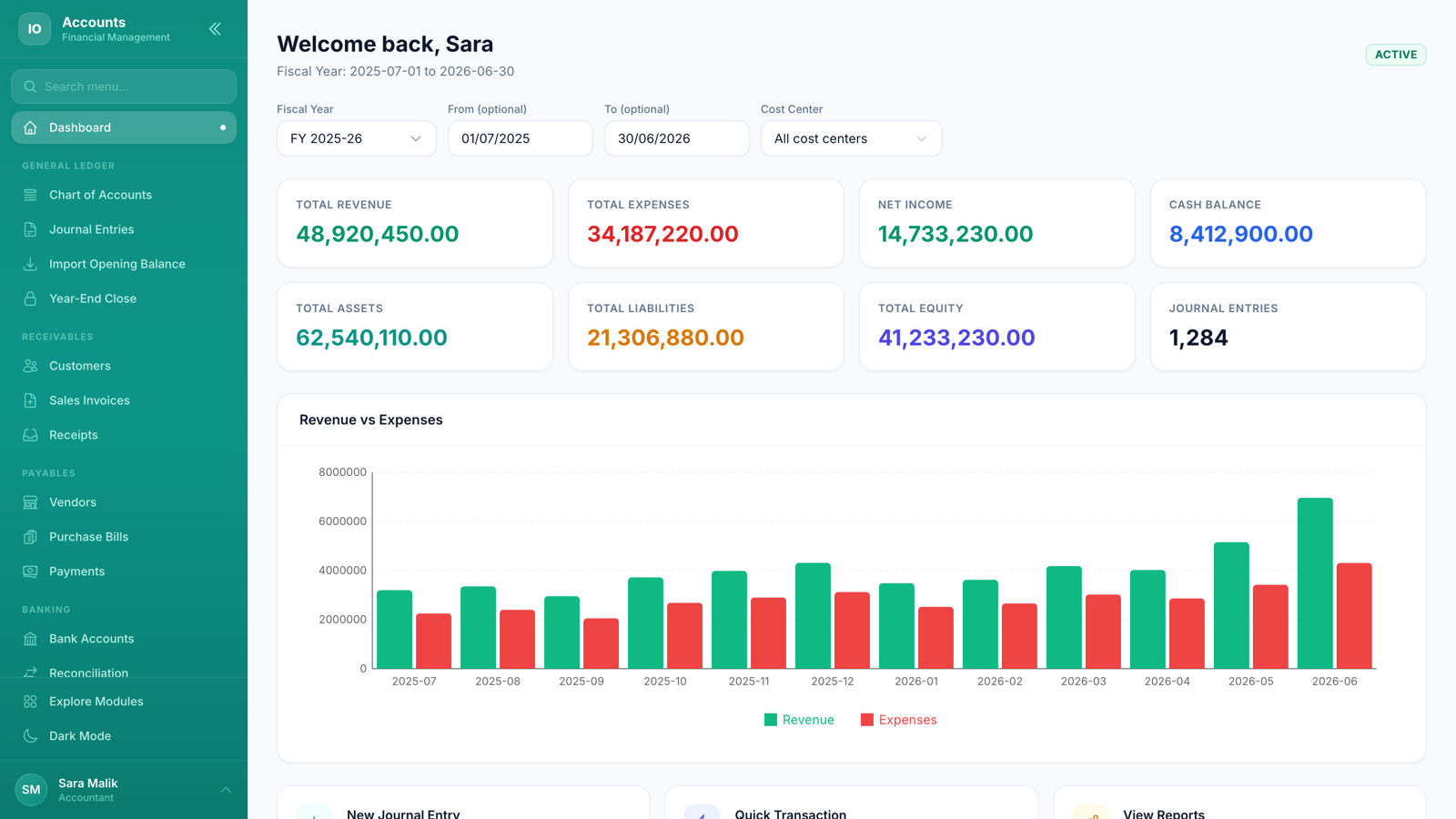
Here's what you'll get — a clean, intuitive interface designed for speed.
Financial Dashboard
-
Revenue, Expenses, Net Income at a glance
-
Monthly Revenue vs Expenses chart
-
Cash balance, total assets, liabilities, equity
-
Journal entry count and quick action links
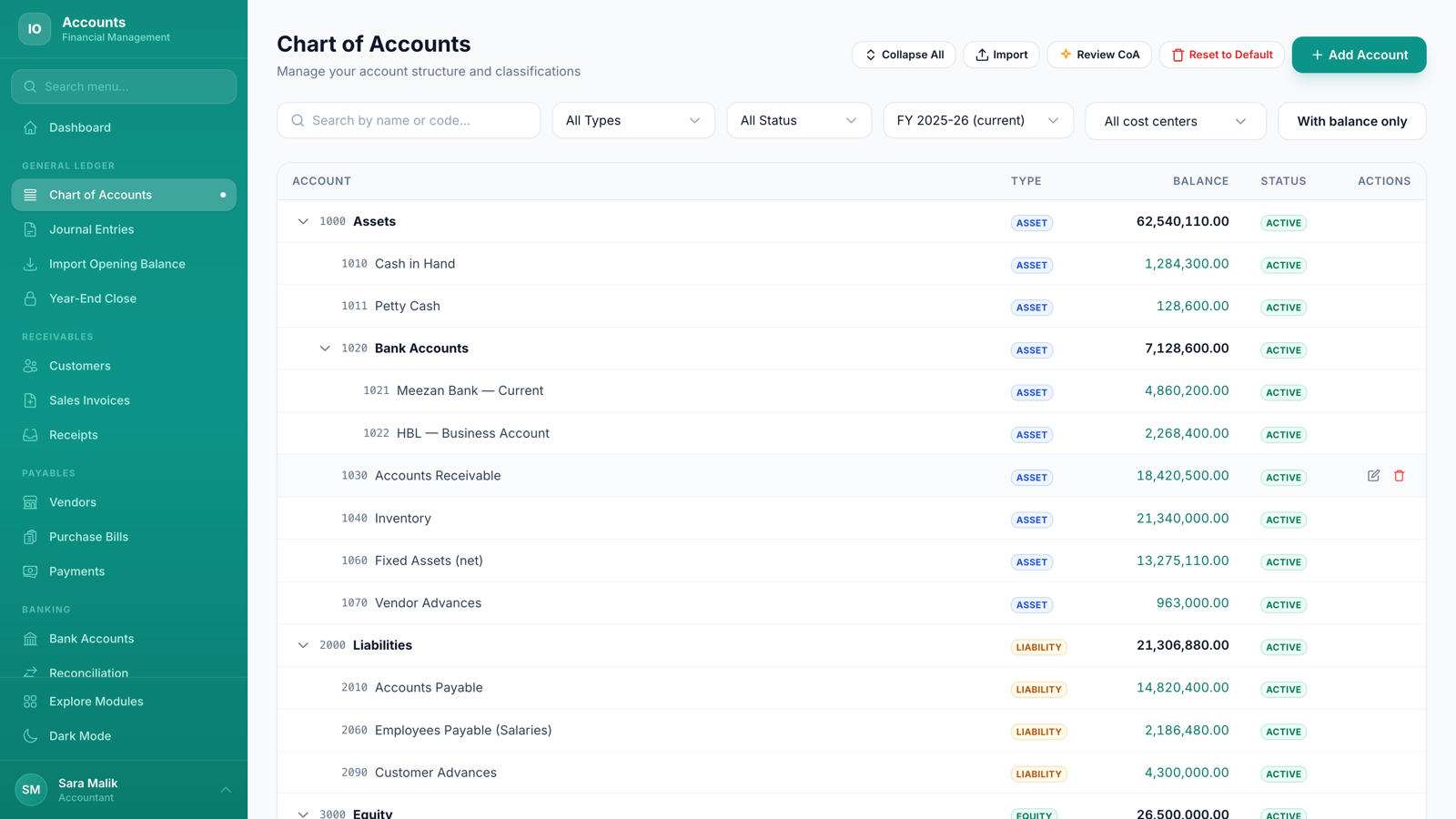
Chart of Accounts
-
Organized by type: Asset, Liability, Equity, Revenue, Expense
-
Search and filter by type, status, fiscal year or cost centre
-
Add custom accounts or use country templates
-
Activate/deactivate accounts without losing data
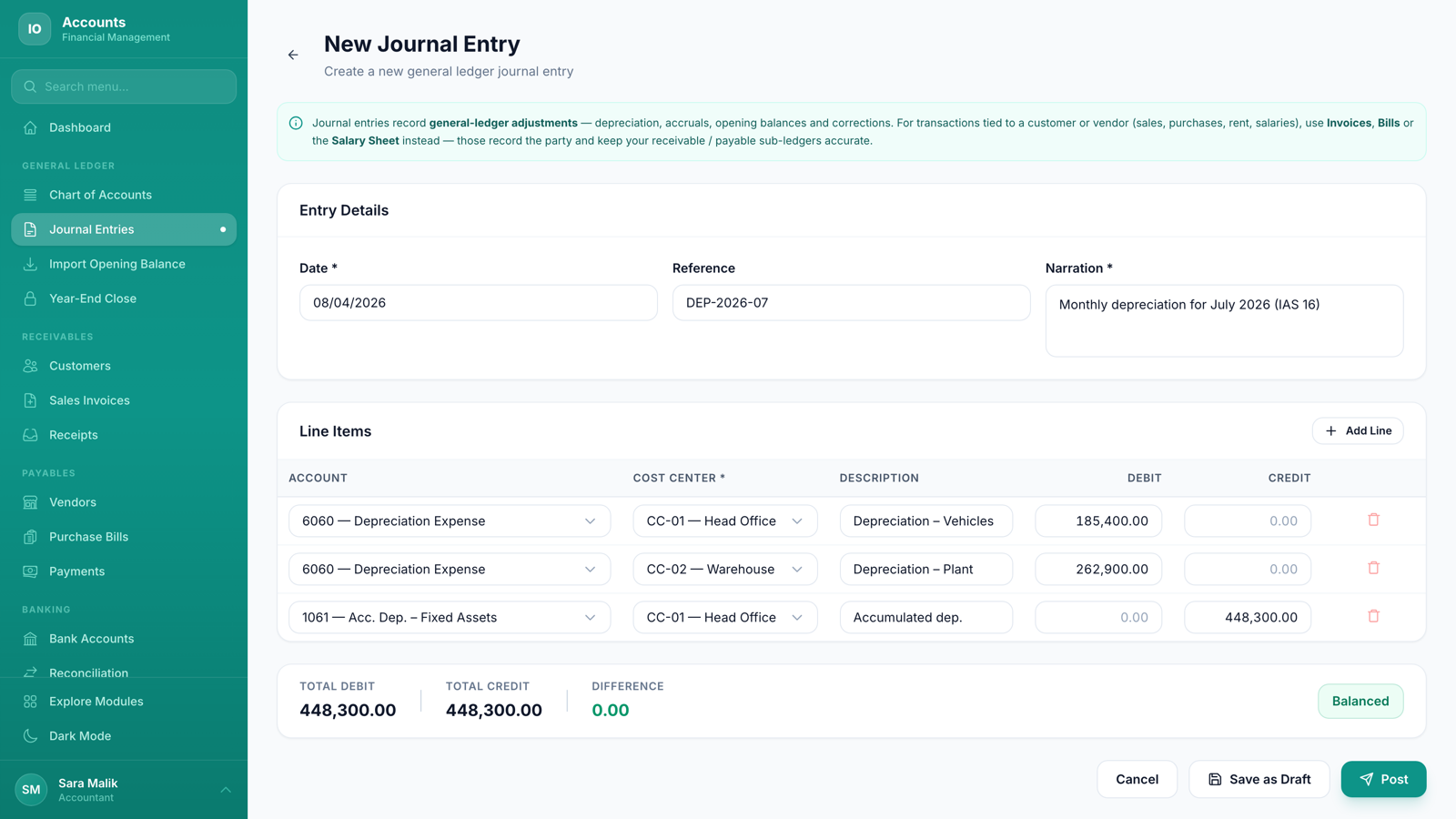
Journal Entries
-
Create entries with unlimited debit/credit lines
-
Real-time DR/CR balance indicator
-
Draft → Post → Reverse lifecycle
-
Fiscal year and period validation
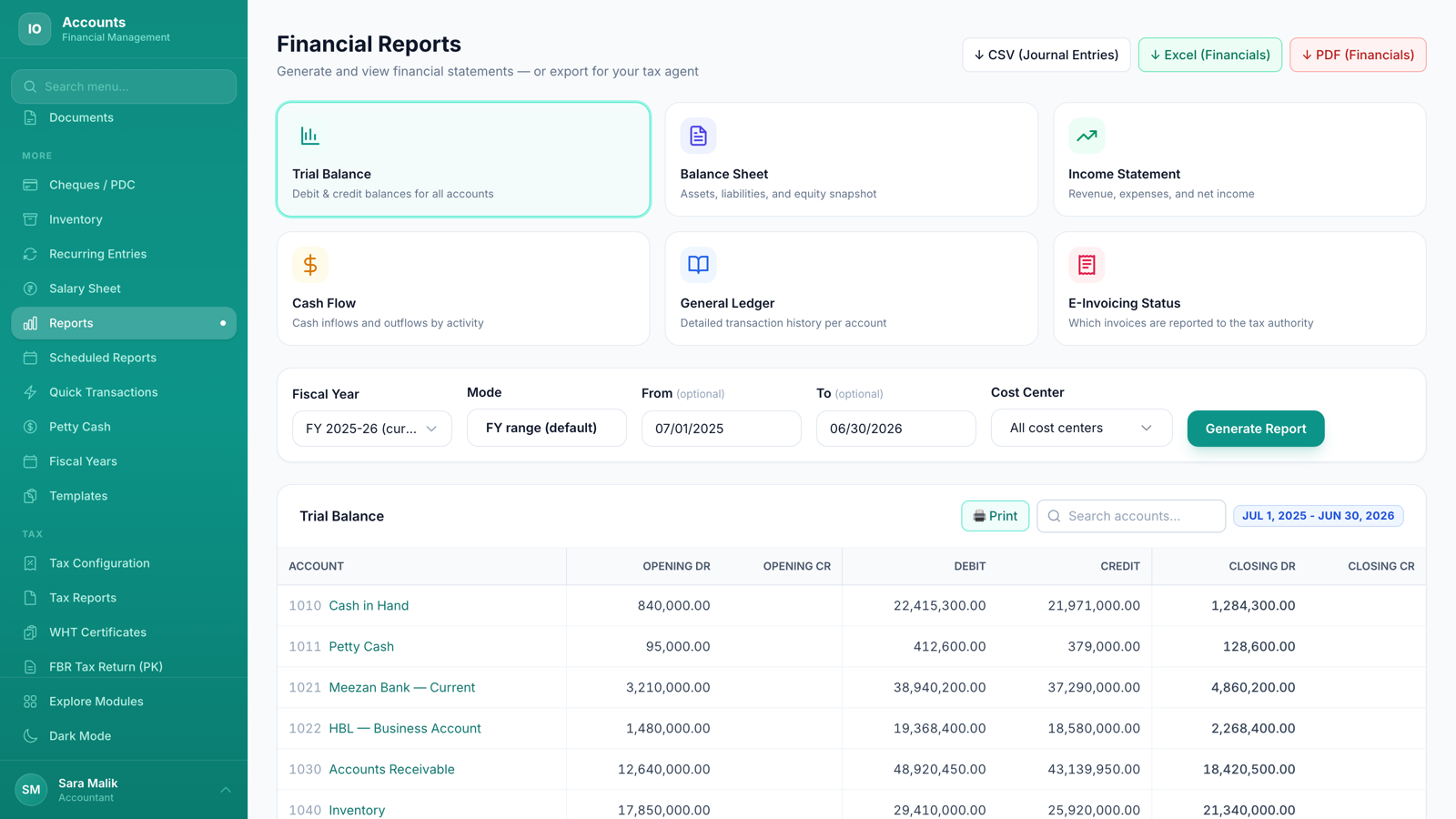
Financial Reports
-
Trial Balance, Balance Sheet, Income Statement
-
Cash Flow Statement and General Ledger
-
Filter by date range and fiscal year
-
Export reports for auditors and tax filing
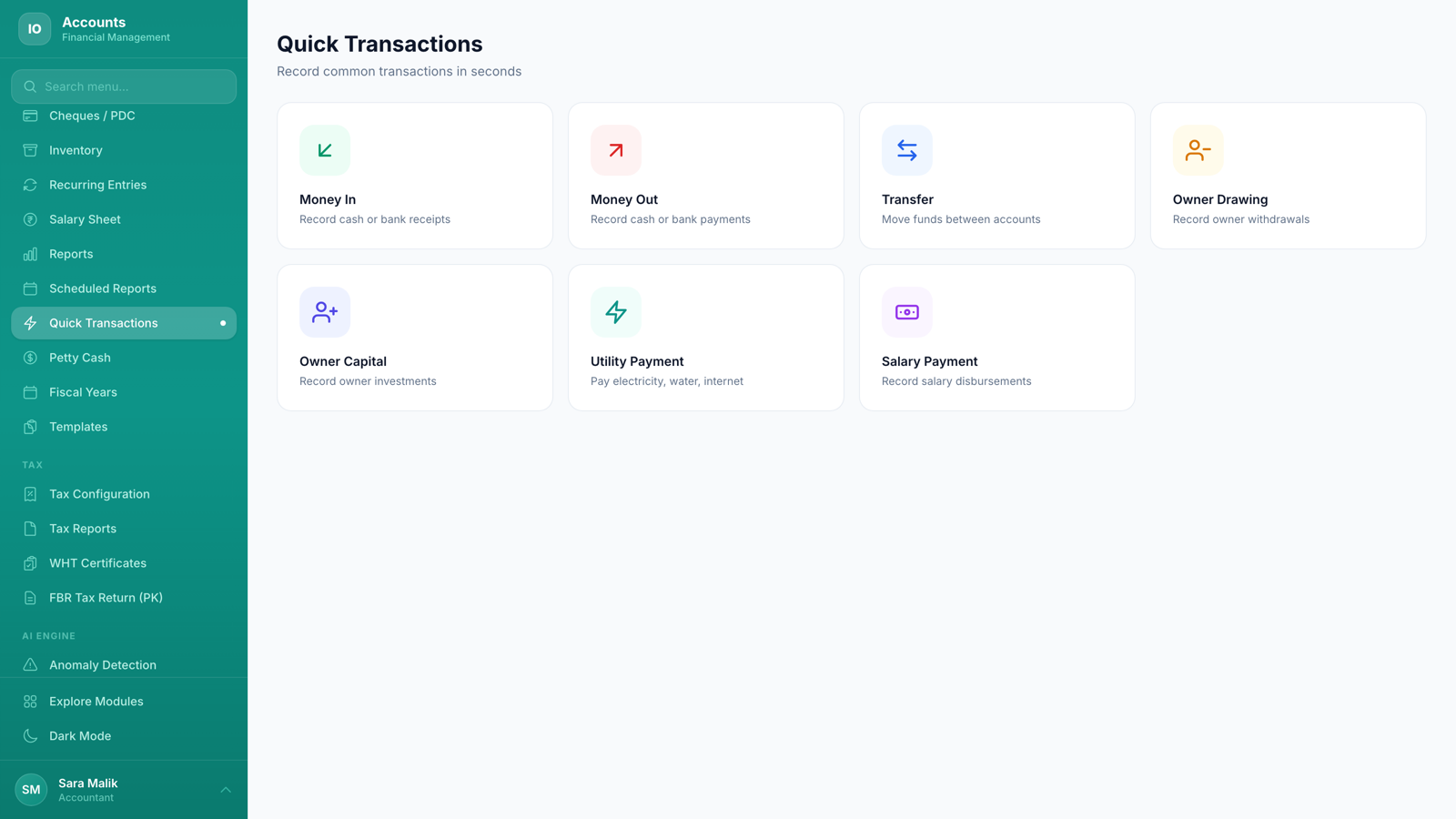
Quick Transactions
-
7 one-click types: Money In, Money Out, Transfer, Utility & Salary Payment
-
Owner Drawing and Owner Capital entries
-
Cost centre tagged on every entry for departmental reporting
-
Creates proper journal entries automatically
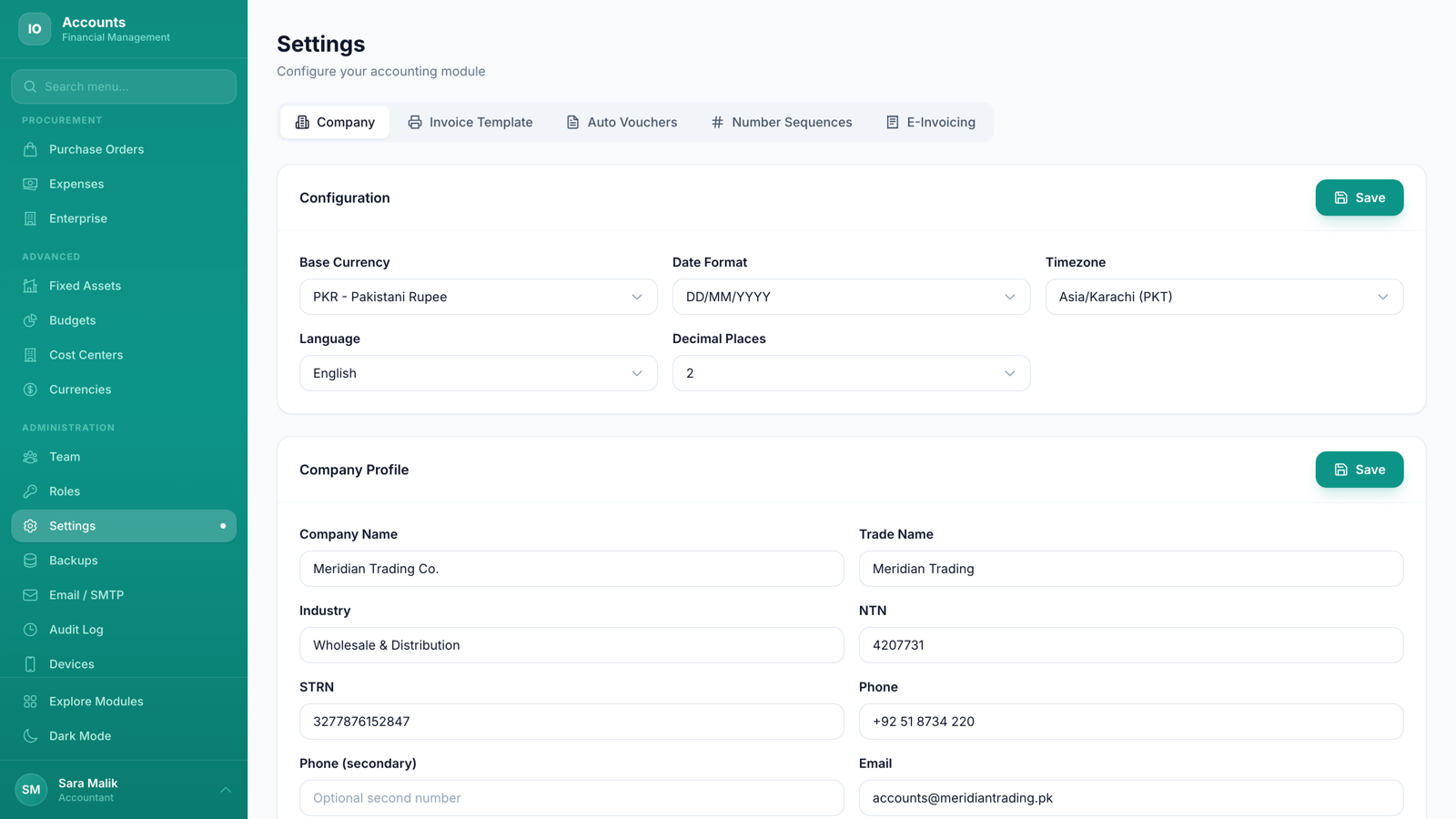
Settings & Configuration
-
Company profile with country and base currency
-
Auto Voucher mapping — customize DR/CR accounts
-
Number sequences for vouchers and entries
-
Role-based access with 35 permission categories
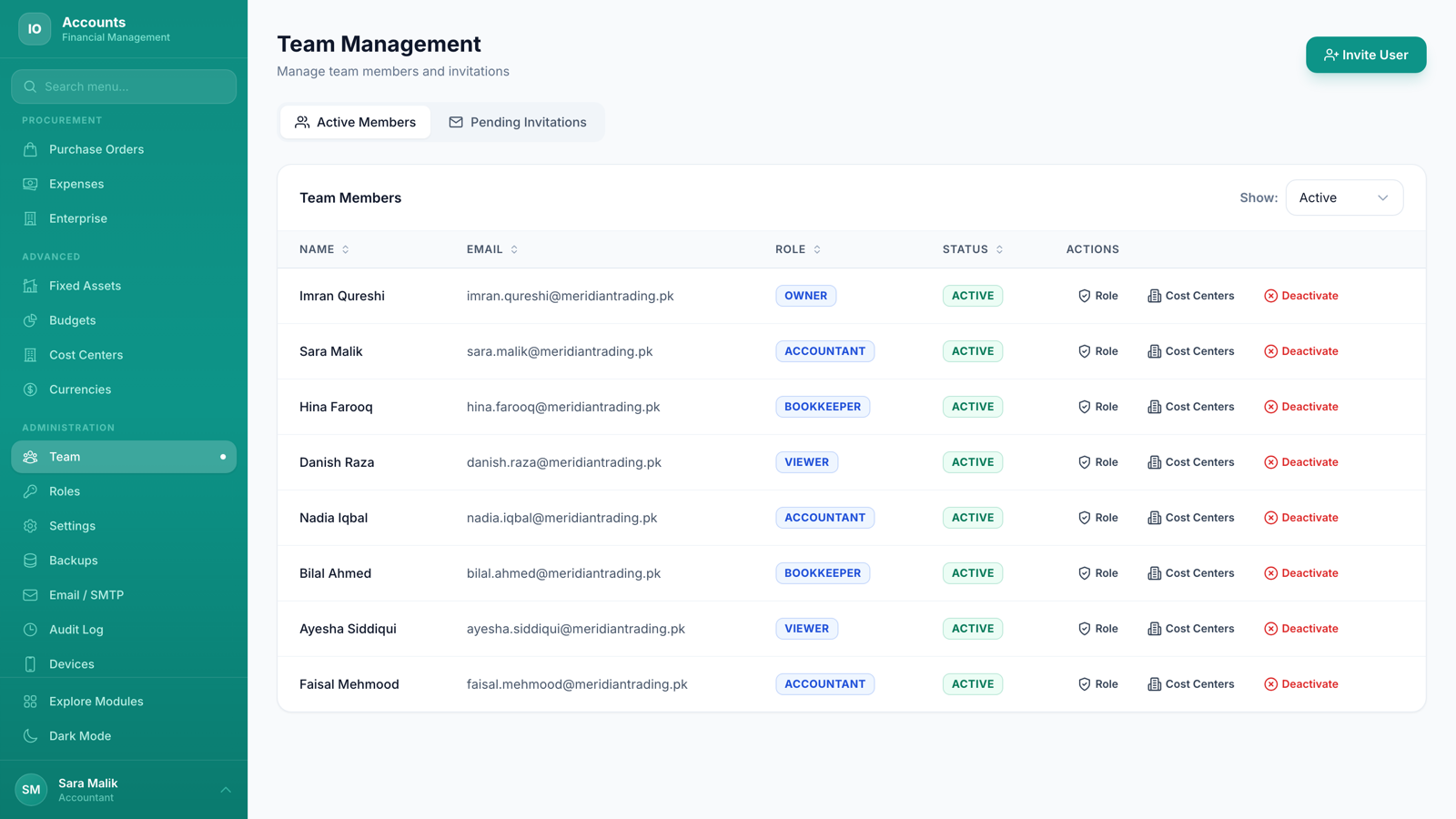
Team & Permissions
-
Invite team members by email
-
Custom roles with granular permission matrix
-
Device PIN login for quick daily access
-
Full audit log — every action tracked
Complete Feature List
Every feature built to help your business run faster and smarter.
FBR Digital Invoicing — Pakistan (Tax Filing add-on)
-
Built to the official FBR Digital Invoicing API v1.12, the same spec licensed integrators and PRAL work to
-
Post a sales invoice and it is transmitted in real time; the IRN comes back and is printed on the invoice with its QR code
-
Validate before you commit — a dry-run against FBR that reports errors without consuming an IRN
-
Buyer registration status checked automatically, so registered and unregistered buyers are treated correctly
-
Canonical FBR province list and HS codes handled for you — no free-text mismatches to get rejected
-
Sandbox and production environments, switched per company; nothing goes live until you say so
-
Failed submissions queue and retry with a full status trail, so no invoice is silently lost
-
Static egress IP support for the FBR token IP whitelist
ZATCA Phase 2 e-Invoicing — Saudi Arabia (Tax Filing add-on)
-
Full Phase 2 (Integration) support — device onboarding from CSR to CSID, so your unit is enrolled with ZATCA
-
Standard (B2B) invoices cleared with ZATCA and simplified (B2C) invoices reported, chosen automatically from the buyer's VAT number
-
Signed UBL 2.1 XML with XAdES cryptographic stamping, hash chaining (PIH) and an invoice counter, exactly as ZATCA requires
-
Base64 TLV QR code generated and placed on the printed invoice
-
Arabic and English invoice output
-
Validated against ZATCA's own compliance endpoint — their validator, not just ours
Chart of Accounts
-
Pre-built templates for multiple jurisdictions and international accounting standards
-
6 account types: Asset, Liability, Equity, Revenue, Expense, COGS
-
Sub-types for detailed classification (Current Asset, Fixed Asset, etc.)
-
Custom account codes with auto-numbering
-
Activate/deactivate accounts — data always preserved
-
Search by name or code; filter by type, status, fiscal year and cost centre
Bringing Your Existing Books In
-
Import your chart of accounts from a CSV exported by QuickBooks, Tally, Xero or anything else — sample file provided so the columns are never a guessing game
-
No file to hand? Photograph or paste your existing chart and the AI builds it for you
-
Or start from a ready-made chart — Pakistan SME, e-commerce or service business — and adjust from there
-
Nothing is written until you approve the preview: each row shows as new, already-present, or an error with the reason
-
Accounts you already have are skipped, never duplicated
-
Bring last year in as an opening trial balance — matched accounts are used, and the AI proposes the unmatched ones for you to edit and approve
-
The opening balance posts as a single dated entry tagged to a cost centre, and can be reset and re-imported while the year is still empty
-
Bank statements import per account from CSV or OFX, so reconciliation does not start with typing
Journal Entries & Posting
-
Full double-entry with unlimited debit/credit line items
-
Real-time balance indicator — warns when DR ≠ CR
-
Draft, Post, and Reverse lifecycle with audit trail
-
Fiscal year and period validation — block entries in closed periods
-
Attachments and descriptions per line item
-
Auto-generated voucher numbers with configurable sequences
Financial Reports
-
Trial Balance — verify all debits equal credits
-
Balance Sheet — assets, liabilities, equity snapshot
-
Income Statement — revenue and expenses for any period
-
Cash Flow Statement — operating, investing, financing activities
-
General Ledger — full transaction history per account
-
Account Balances — quick summary across all accounts
Quick Transactions
-
Money In — record sales, collections, refunds received
-
Money Out — record purchases, expenses, refunds given
-
Transfer — move funds between bank and cash accounts
-
Owner Drawing & Capital — track personal withdrawals and investments
-
Utility Payment — record electricity, gas, water, internet bills
-
Salary Payment — bulk or individual salary disbursements
-
Each creates proper double-entry journal entries automatically
Petty Cash & Templates
-
Dedicated petty cash fund tracking with balance monitoring
-
Record cash spent and replenishments with descriptions
-
Monthly petty cash summary reports
-
Reusable Transaction Templates — save common entries
-
Batch Use — apply templates to create multiple entries at once
-
Template library for recurring transactions (rent, salaries, utilities)
Fiscal Years & Periods
-
Create fiscal years aligned to your country (Jan-Dec, Apr-Mar, Jul-Jun, Oct-Sep, and custom)
-
Auto-generated monthly periods within each fiscal year
-
Close individual periods to prevent backdated entries
-
Close entire fiscal year with year-end processing
-
Multiple open fiscal years for transition periods
-
Period-scoped reporting for accurate comparisons
Team, Roles & Audit
-
Invite team members via email — they set their own password
-
Custom roles with 35 permission categories (COA, JE, Reports, Settings, etc.)
-
Seed default roles: Owner, Accountant, Bookkeeper, Viewer
-
Device PIN login — 4-digit quick access on trusted devices
-
Complete audit log — every action tracked with user, timestamp, and details
-
Filter audit log by user, action type, entity, date range
Setup Wizard & Configuration
-
Smart Setup Wizard — select country, get chart of accounts and fiscal year automatically
-
Jurisdiction-specific templates — multiple markets supported plus international standards
-
Company profile with business type, currency, and tax settings
-
Auto Voucher configuration — map transaction types to default accounts
-
Number sequence customization for vouchers and entries
-
Settings are permission-gated — only admins can modify
Who Is This For?
One Accounts - Smart Accounting System, multiple industries — with features tailored to each.
Small & Medium Businesses
Replace spreadsheet accounting with a real double-entry system. Quick Transactions make daily bookkeeping as simple as filling a form — the system creates proper journal entries behind the scenes.
Accounting Firms & CPAs
Manage multiple client companies from one platform. Each company gets isolated books. Generate audit-ready Trial Balance, Balance Sheet, and Income Statement in seconds.
Multi-Branch Enterprises
Consolidate financial data across branches and subsidiaries. Multi-company addon enables group reporting with intercompany eliminations.
Tax-Compliant Businesses
Built for any regional tax regime from day one — VAT, GST, sales tax, e-invoicing, IFRS & GAAP. Jurisdiction-specific chart of accounts templates ensure proper tax categorization.
Why Smart Finance Teams Are Switching to IO Snack Accounts
See exactly what changes the day you switch — issue by issue.
Tax rules change, software stays foreign — manual workarounds
Multi-region tax engine: VAT, GST, e-invoicing, any jurisdiction
Can't tell if you made or lost money this week without calling the accountant
Live P&L, balance sheet, and cash flow on your phone — decisions backed by today's numbers
First-time setup eats weeks of consultant hours
Smart Setup Wizard — working chart of accounts in seconds
Daily bookkeeping = 30 clicks per transaction
Quick Transactions — one-click bookkeeping for the daily grind
Month-end close eats the first full week of every following month
Automated reconciliation + live reports — month-end closes the same day
Switching means re-typing your whole chart of accounts and last year's balances
Import the chart from a CSV, a photo or a starter template, then bring last year in as an opening trial balance
Recurring entries typed by hand month after month
Reusable templates with batch use — set once, post in bulk
Anomalies discovered at audit, not in time to fix
AI categorization + anomaly detection on every entry
Multi-company books don't consolidate without a spreadsheet
Built-in consolidation across companies, currency-aware
Petty cash expenses lost in chat threads and paper slips
Petty cash module with vouchers, approvals, and reports
Accountants forced to share full admin access
29-category permissions + custom roles — least privilege by default
Same books. Real-time clarity. Stop closing the year in panic.
Start Bookkeeping RightReal Businesses Run on IO Snack
The same team and codebase behind this product power these deployments — explore them.




Build Your Exact Price
Pick the add-ons you need and see your total in real-time. No sign-up required.
Accounts - Smart Accounting System Included
Double-entry accounting with tax-authority e-invoicing available as an add-on. FBR Digital Invoicing for Pakistan, built to the official DI API v1.12, submits each sales invoice and returns its IRN and QR onto the document; ZATCA Phase 2 for Saudi Arabia covers device onboarding, signed UBL 2.1 with XAdES stamping and the TLV QR code, clearing standard B2B invoices and reporting simplified B2C ones - both delivered through the Tax Filing & Compliance add-on. The base plan carries Chart of Accounts, Journal Entries, Fiscal Years, Financial Reports (Trial Balance, Balance Sheet, Income Statement, Cash Flow), Quick Transactions, Petty Cash, Transaction Templates and multi-company consolidation — IFRS and GAAP compliant, with native VAT, GST and sales tax engines for any jurisdiction.
Optional Add-ons
Click to add or remove. Total updates instantly.
Your Plan Summary
Upgrade anytime
Accounts - Smart Accounting System FAQ
Common questions about Accounts - Smart Accounting System.
Related reading from the IO Snack blog
Deeper dives on the problems Accounts - Smart Accounting System solves.
Ready to Get Started with Accounts - Smart Accounting System?
Subscribe now and start managing your business today. Cancel anytime.
Starting at $108/month · Cancel anytime